Givers can set up a gift that repeats: weekly, fortnightly, every 4 weeks, monthly or yearly. They pay by card or, in the UK, by Direct Debit. Each payment is a gift like any other, with its own receipt, and appears in Donations, payouts and reports.
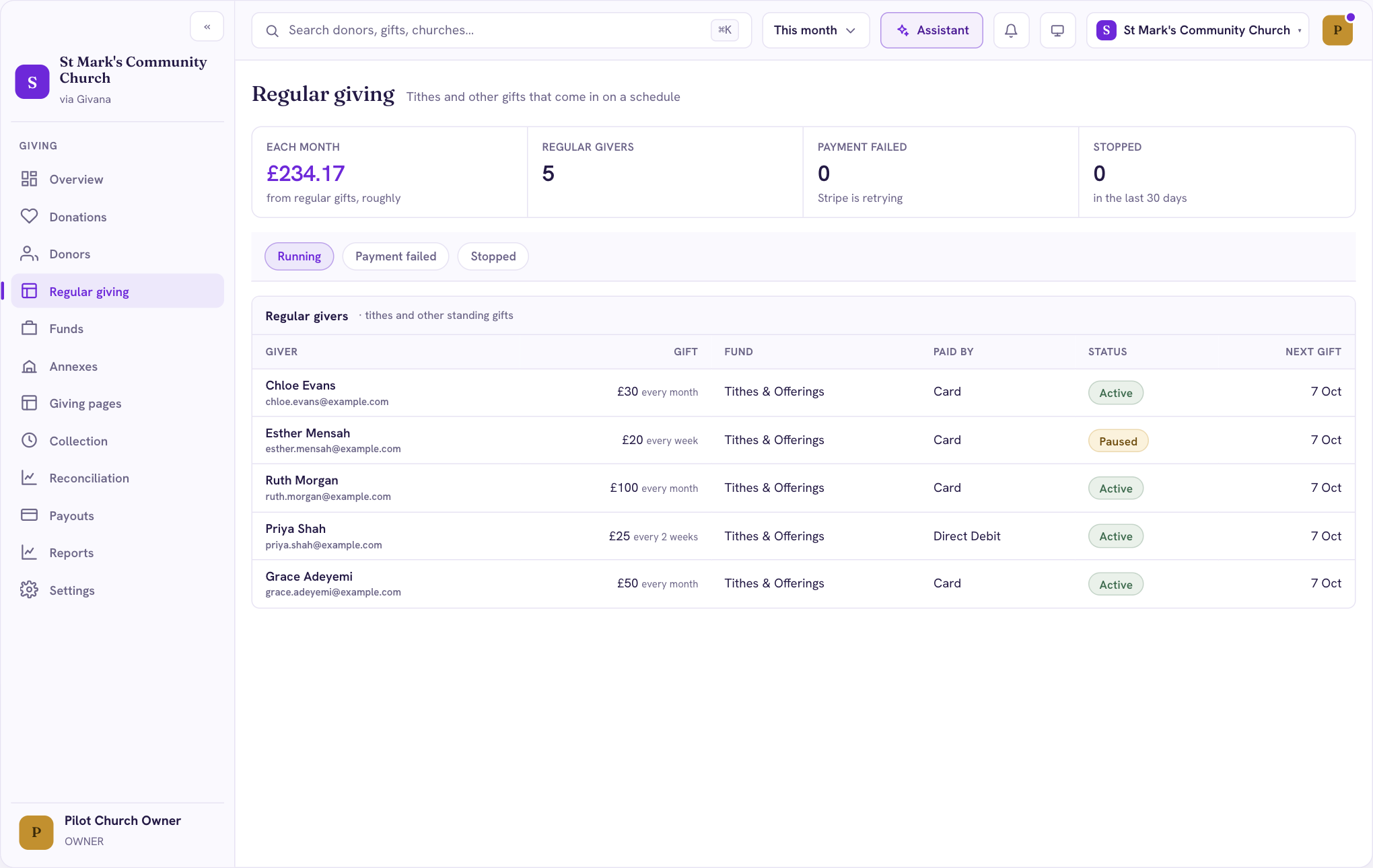
Following your regular gifts
Regular giving in the menu shows:
- Each month: roughly how much regular gifts bring in a month
- Regular givers: how many gifts are running
- Payment failed: gifts where the last payment didn't go through. Stripe retries, and the giver is emailed.
- Stopped: gifts that stopped in the last 30 days
The list shows each giver, their gift and how often, the fund, how they pay, its status and the next payment date.
Givers manage their own gifts
Givers change, pause or stop their gift themselves, from a link in their emails. You don't need to do anything, and they don't need an account. When a gift stops, you get a notification.
Turning it off
Regular giving is on by default. To stop offering it, go to Settings → Giving page, and under Defaults turn off Offer regular giving. Gifts already running carry on.